Using the M-543 computer lab

It is possible to use the M-543 computer lab for doing the course assignments in Lightroom. In the following weeks the room should be available on these times:

  • Wednesday 9:00-16:00
  • Thursday 9:00-16:00
  • Friday 9:00-14:00

Please always check the availability from ASIO as there might be additional activities booked in the room:

In order to get access to the room, you should go to the office of the School of Digital Technologies in room A-431 and tell to the study counsellors that you are taking the digital photography course and need to use the software in M-543 lab. The study counsellors are there during office hours (Monday-Friday 9:00–16:00). It is not possible to get access to the lab during weekends or later in the evening.

Digital photography class today in Zoom

I have fallen ill and have to do the class today in Zoom:
https://zoom.us/j/97845024080

Today we are going to start editing RAW photos in Lightroom, so you need access to Lightroom in order to follow the class. My colleague will let you in to the M-543 computer lab at 16:00 and set up the Zoom call with me.

In order to ask questions you may use Zoom on your personal device or install Zoom to the lab computers.

The class is going to be recorded, but I ask you to participate the class in real time so that by the end of the class we could see your edits and give feedback.

Digital photography course starts again

This week we are starting the 2022 edition of the Basics of Digital Photography course. Our school has purchased Adobe Creative Cloud licenses and this year we are going to organize the course in a computer lab. As in previous year, the course is going to be a mix between lectures, practical classes and photography assignments. Adobe Lightroom Classic is going to be used as main application for editing photos.

There are still some vacant places in the course. Students interested in digital photography are welcome to join us. The first class is going to take place on Wednesday 07.09 at 16:15 in room M-543.

Assessment

The course ends with pass-fail assessment. In order to pass the course you have to compile and present an online photography portfolio. See Assignment 10 and resources about photography portfolios.

As some BFM students have another course which is taking place at the same time on Mondays, I decided to add the second main assessment time in January. The assessment times announced in ÕIS are the following:

Main assessment 1:
Monday 06.12.2021 at 16:15 (Zoom)

Main assessment 2:
Monday 10.01.2022 at 16:00 (Zoom)

Additional assessment:
Monday 24.10.2022 at 16:00 (Zoom)

The second main assessment time on 10.01 is not only for BFM students, but also others who feel that they need additional time for completing the portfolio may register for the 10.01 assessment.

All the Zoom session recordings are linked in Flickr group.

Software recommendations and possibility to attend/rewatch over Zoom

This week we will move into image management and editing software. I have decided to start recording lectures using Zoom, so that you can watch the recordings if necessary. If some of you want to attend over Zoom instead of coming to the university, you may use this link (the same links works until the end of the course):
https://zoom.us/j/97596510146

I will share the links to the recordings in Flickr group.

Tomorrow we are looking at various applications for managing photos. Depending on the application you may want to download and install the application or demo version before the class.

Commercial image management and editing applications:

  • Lightroom – there is only a 7 day demo version for Lightroom – DO NOT INSTALL IT YET, if you are planning to use the demo.
  • Capture One Pro – this application is on the expensive side (349 euros), but it offers a 30 day demo. You may download the demo now, it is going to be useful in the coming weeks and no credit card is needed.

Free image management and editing applications:

  • Apple Photos – if you are a Mac user, you can manage your RAW images and do some basic editing in Apple Photos
  • darktable – if you plan not to spend any money on software, this is probably the closest free alternative to Lightroom and Capture One Pro

Hope to see many of you in the university tomorrow. Take your laptop with you.

Photo walk in Kadriorg

The weather forecast does not promise any rain for tomorrow, so it is sure that we can have the photo walk as scheduled.

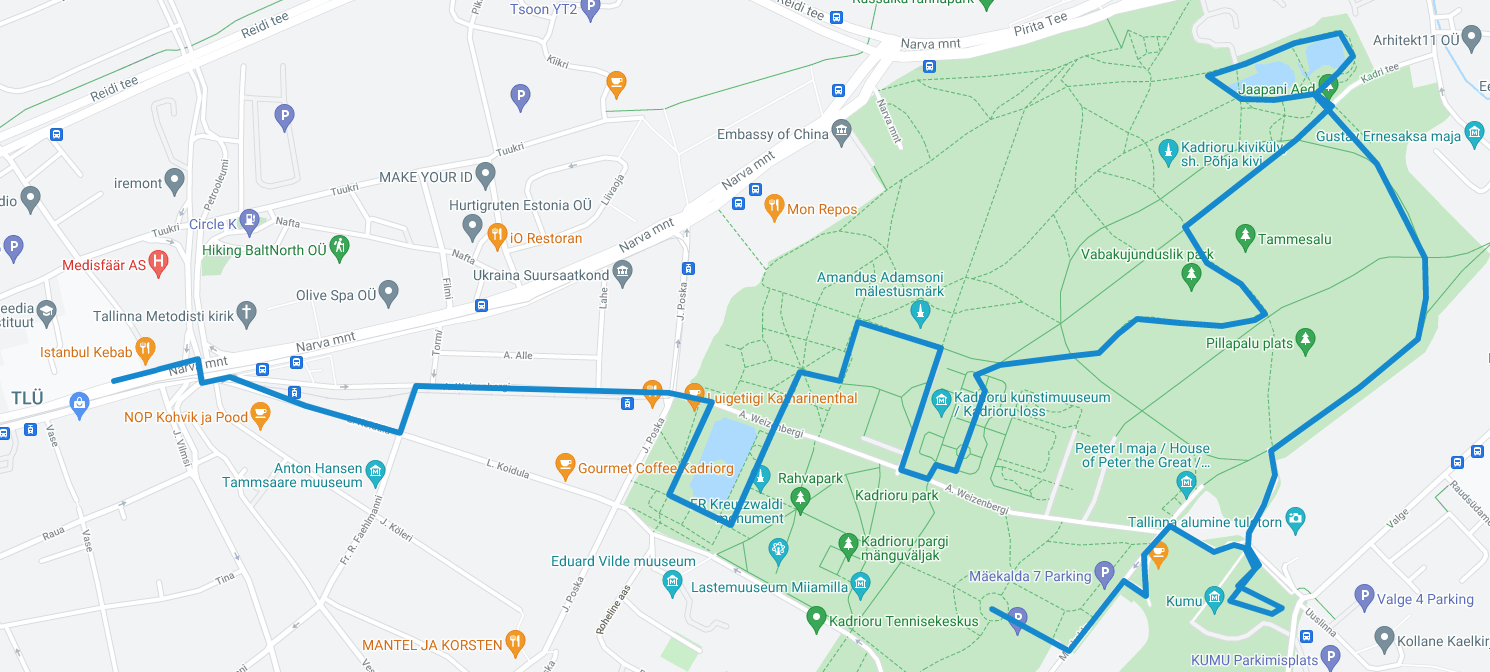
We are going to meet and leave for the walk at 16:15 in front of the Astra building. If you are late, please follow us according to the map. I am planning to visit the following areas in Kadriorg park:

  1. Luigetiik
  2. Palace and the garden
  3. Park
  4. Japanese garden
  5. KUMU

The planned route is about 5 km and will take about 90 minutes. For inspiration, please have a look at photos taken in Kadriorg.

Please charge your batteries and make sure that your camera is set to shoot RAW+JPEG. You will still upload JPEGs from this walk (see Assignment 4), but in next weeks we are going to edit RAW files.

A new beginning for the digital photography course

My name is Hans Põldoja and I am going to be your lecturer in the digital photography course. In Tallinn University my main role is being head of studies in the School of Digital Technologies and I am also teaching, supervising and doing research in the field of educational technology. I do not have any professional background in photography, but taking photos has been my hobby for 20+ years. I am mostly interested in travel, street, architecture and landscape photography. Teaching a photography course is going to be a new challenge for me and I hope to learn a lot during this process.

Basics of Digital Photography has been part of Crossmedia BA programme since 2012. This year I am taking the course over from Mati Mõttus, who has been teaching the course in previous years. I am also adjusting the format and content of the course according to my own photographic background.

We are moving the course from a computer lab to a lecture hall, but my aim is to organize it as a series of seminars where we can discuss and give feedback to the assignments. YouTube is full of good photography and photo editing tutorials. Instead of lecturing I am planning to choose the best recommended videos for you on each course topic.

In order to do the course assignments you should have access to a digital camera. Any camera which has manual settings and can shoot in RAW format is OK.

Earlier Photoshop has been used as a main software in this course. This year I am expecting that you will use your own laptops with the editing software that you have. I am going to use Adobe Lightroom as the main RAW editor, but I will also demonstrate the editing principles in Capture One Pro, DxO PhotoLab and Luminar AI. There are also several free software options for editing RAW photos.

As a final outcome of the course we will all build our photography portfolios which will be presented in the last meeting.